


Weather Kitty - App & Widget
4.914.06K Reviews
App Specs
- Version
- 6.2.7
- Updated On
- License
- Free
- Downloads
- 1,000,000+
- Developer
- Weather Creative Inc.
- Categories
- Weather
- Platform
- Android, iOS
Screenshots
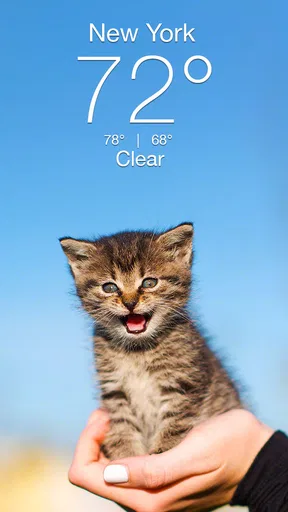

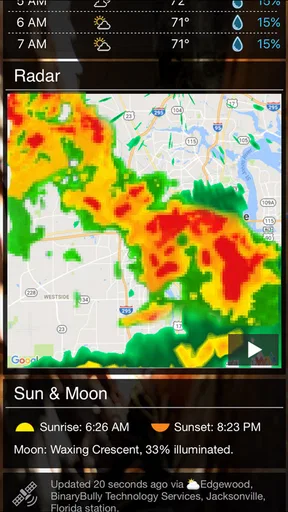
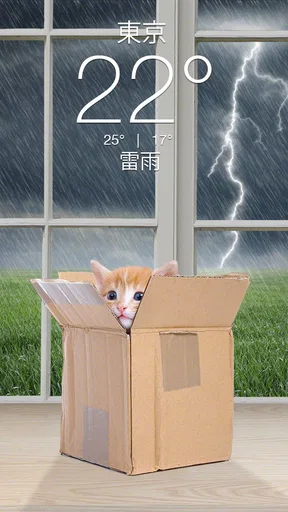

 Analysis by AppCompare
Let's dive into a delightful mix of utility and cuteness with the Weather Kitty - App & Widget. If you've ever thought checking the weather could use a sprinkle of joy, you're in for a treat. This app combines weather forecasts with the adorable charm of kittens. Yes, you read that right—kittens!
Before deciding whether that charm is worth making room for on your phone, I’d look at how you actually use a weather app. I tend to check the forecast in quick bursts: before leaving home, while deciding what to wear, and when plans depend on rain or heat. A cat-themed screen can make those little checks more pleasant, but the useful question is whether the information fits your routine as well as the presentation does.
What the free version means in practice
Weather Kitty is a free weather app from Weather Creative Inc., and it has been available since Oct 10, 2014. Its current version is 6.1.8, with Android compatibility starting at 7.0. Optional in-app purchases range from $0.99 to $49.99 per item, so I’d treat the free download and the optional spending as separate decisions rather than assuming every theme or extra is included.
That distinction matters because the basic appeal is easy to understand without paying: check the weather and see a cat-themed presentation. If you only want a quick local forecast, you can try the free app first and decide from actual use whether any extras matter to you. The available purchase range is broad, so I would check the price shown for a particular item in the app before buying, rather than guessing what a specific theme or upgrade costs.
The age rating is Teen. That may be relevant if you are choosing apps for a family device, though the weather function itself is aimed at ordinary day-to-day planning. The app has a 4.9 average from around 75,000 ratings, and it has passed over one million installs. Those figures suggest that the cat-and-weather combination has found an audience, but they do not tell me whether its forecast presentation will suit your habits.
First Impressions
As soon as you open Weather Kitty, you're greeted by an interface that's both intuitive and playful. The app neatly displays your local weather, complete with hourly and daily forecasts, all while being adorned by a furry feline friend. The layout is clean, making it easy to navigate, and the colors are vibrant yet soothing, which is great because, let's face it, we're here for a pleasant experience.
That first glance is most useful when you need a fast decision, not when you want to study every detail. For example, if I’m getting ready for work, I can use the hourly view to think about whether a light jacket is enough for the trip out and back. For a longer outing, the daily forecast gives a broader planning window. I would still treat any forecast as guidance rather than a promise, especially when the weather is changeable.
Worth Reading Before You Choose

EA SPORTS FC Mobile 26 Is a Bigger Football Game, but It Takes Time

Flipboard Shows What News Apps Must Do Beyond the Feed

Switching to Android Auto Means Rethinking Your Driving Routine

Google Calendar Makes a Crowded Week Easier to Manage

Ludo King Makes the Most of the Minutes Between Plans

Baby Panda World Brings Quick Play to Modern Phones, but Its Game Library Feels Busy
The home-screen widget is potentially the more practical part of the design. If you check conditions several times a day, placing a forecast where you already look can save the small step of opening the app. A useful setup is to put it somewhere visible but not crowded, then use the full app when you need more detail. That way the cat artwork adds personality without turning every weather check into a longer browsing session.
Features That Stand Out
Now, onto the features. This app isn't just about cute cats (although they are a big part of it); it actually provides weather information. You can check everything from current temperature to extended forecasts, with details like humidity, wind speed, and even UV index.
- Hourly and Daily Forecasts: It’s incredibly convenient to have both short-term and long-term forecasts at your fingertips. Whether you’re planning a day out or a weekend trip, this app has got you covered.
- Customizable Widgets: The widget feature is a game-changer. You can place these adorable weather updates right on your home screen. Just imagine starting your day with a quick glance at the weather accompanied by a cute kitty.
- Multiple Themes: For those who love variety, the app offers different themes, from playful to serene. You can even unlock more themes as you use the app, which keeps things fresh and exciting.
One small but useful habit is to check the hourly view at the time you expect to be outside, rather than relying only on the day’s headline condition. A day that looks broadly fine can still have an inconvenient stretch of rain or a change in temperature. The combination of hourly and daily views lets you move from the quick overview to a more practical question: what will it feel like when I need to leave?
For a weekend plan, I’d use the daily forecast as a reason to prepare, not as a detailed itinerary. If the outlook looks unsettled, I might keep an indoor alternative in mind; if it looks pleasant, I’d still check again before setting off. That’s a sensible way to use any weather app, and it prevents the cheerful presentation from making a forecast feel more certain than it is.
The themes are a personal-value feature rather than a forecasting advantage. If you enjoy changing the look of your screen, variety can make the app feel more like yours. If you care only about weather information, themes are easy to ignore. I would not spend simply because an extra is available; I’d first use the free experience long enough to see whether the widget and forecast layout have earned a regular place in my routine.
How It Performs
Performance-wise, the app is solid. It loads quickly and updates with current weather information, ensuring you're less likely to be caught off guard by a change in conditions. The data seems accurate compared to other weather apps, which is crucial when you're planning your day.
What’s more, the settings offer a level of customization that lets you tailor the app to your preferences. Whether you want notifications for extreme weather or prefer a simple daily update, Weather Kitty has the flexibility to accommodate.
For a realistic morning routine, I’d glance at the widget while making coffee, then open the app only if the hourly forecast could affect my commute or an errand. If I see a possible change later in the day, I can plan around it rather than repeatedly checking the screen. The widget works best as a prompt for that first decision; it should not replace checking conditions again when the timing matters.
Compared with a typical built-in weather app, the main difference here is the character of the presentation: cats and themed visuals sit alongside the forecast. Many people will already have a basic weather option on their phone, and that may be enough if they want a restrained interface with no interest in customization. Weather Kitty makes more sense if you like a friendlier look and want a widget that feels less plain, while still keeping forecasts and familiar weather details close at hand.
There is a trade-off in any playful interface: decoration can make a routine check feel warmer, but it is not the same thing as additional forecasting depth. If your decisions depend on highly specialized weather analysis, or you need to compare several locations and conditions in a professional workflow, a more technical weather service may be a better fit. I’d use this app for everyday planning and turn to a specialist source when the stakes or detail requirements are higher.
The Fun Factor
Let’s not forget the entertainment aspect. The app features a collection of cat photos that change with the weather. Rainy day? Expect a kitty with an umbrella. Sunny weather? A cat basking in the sun. It's these small touches that make checking the weather a little more delightful. And if you’re a cat lover, this might just become your go-to app for weather updates.
The cat theme is also why I would recommend trying the app to someone who finds standard forecast screens dull, rather than claiming it is automatically better for everyone. If you are indifferent to cats, the novelty may wear off, leaving the forecast and widget to justify keeping it installed. That is a reasonable test: after a few weeks, ask whether you still use the widget because it is convenient, or whether you only opened the app to browse its appearance.
Moreover, the app offers a premium version with additional themes and no ads. If you find yourself smitten by the concept, it might be worth checking out. The free version, however, holds its own with plenty of features to keep you engaged.
For value, I’d separate practical use from decoration. The forecast and widget are the everyday reasons to keep it; additional themes are a personal treat, and an ad-free option may matter if advertising interrupts your use. Since optional purchases vary in price, I would weigh a specific purchase against how often I use the app, not against an assumption that paying makes the weather itself more dependable.
Final Thoughts
In a sea of weather apps, Weather Kitty - App & Widget stands out for its unique blend of functionality and fun. It's not just about getting the temperature right—it's about making the experience enjoyable. Whether you’re a weather enthusiast or a cat aficionado, this app adds a touch of warmth to your daily routine.
It is a better match for people who want a quick local forecast with a distinctive, cheerful presentation than for users who want a strictly utilitarian screen. Families sharing a device may also want to consider the Teen content rating when deciding whether it suits their household. For most casual users, the clearest way to judge it is to try the free version during normal routines: use the widget in the morning, check the hourly view before an outing, and see whether the cat-led design makes you more inclined to check conditions.
So, if you’re ready to brighten your weather-checking routine with a bit of feline flair, give Weather Kitty a whirl. It might just be the purr-fect app for you!
My buy-or-skip verdict is straightforward: try it free if you like cats, want a more cheerful home-screen forecast, and mainly need everyday local weather. Skip the paid extras if you would not use more themes or an ad-free experience, and choose another weather option if your priority is a technical interface or specialized analysis. For me, the best value is the combination of a glanceable forecast and a little personality; spending beyond that should depend on whether the specific extras genuinely improve your own routine.
Pros
- Adorable cat themes brighten forecasts.
- Accurate weather updates and alerts.
- Customizable widgets for easy access.
- User-friendly interface and navigation.
- Free version offers essential features.
Cons
- Ads can be intrusive at times.
- Limited theme options without purchase.
- Some features require premium upgrade.
- Occasional lag in app performance.
- Widget customization options are basic.
FAQs for Weather Kitty - App & Widget
What features does Weather Kitty offer to enhance user experience?
Weather Kitty provides a whimsical approach to weather updates by featuring adorable cat images along with detailed weather forecasts. It includes customizable widgets, hourly and weekly forecasts, radar maps, and severe weather alerts. Users can personalize the app by selecting different cat themes, making weather checks both informative and enjoyable.
Is Weather Kitty available for both Android and iOS devices?
Yes, Weather Kitty is available for download on both Android and iOS platforms. This cross-platform availability ensures that users can enjoy the app’s cute and functional features regardless of their device preference. Check the respective app stores for compatibility and download information.
Does Weather Kitty require a subscription or in-app purchases?
While Weather Kitty is free to download, it does offer in-app purchases. These purchases typically include additional cat themes and the removal of ads for an enhanced user experience. Subscriptions might also be available for premium features, allowing users to customize their usage further.
How accurate is the weather information provided by Weather Kitty?
Weather Kitty sources its data from reputable weather information services, ensuring a high level of accuracy in its forecasts. While no weather app can guarantee 100% accuracy due to the nature of weather prediction, users can generally rely on Weather Kitty for timely and precise weather updates.
Can I use Weather Kitty without an internet connection?
Weather Kitty requires an internet connection to update its weather forecasts and download new cat images. While some previously downloaded data might be accessible offline, a stable internet connection is recommended for the best experience and to receive the most up-to-date weather information.


